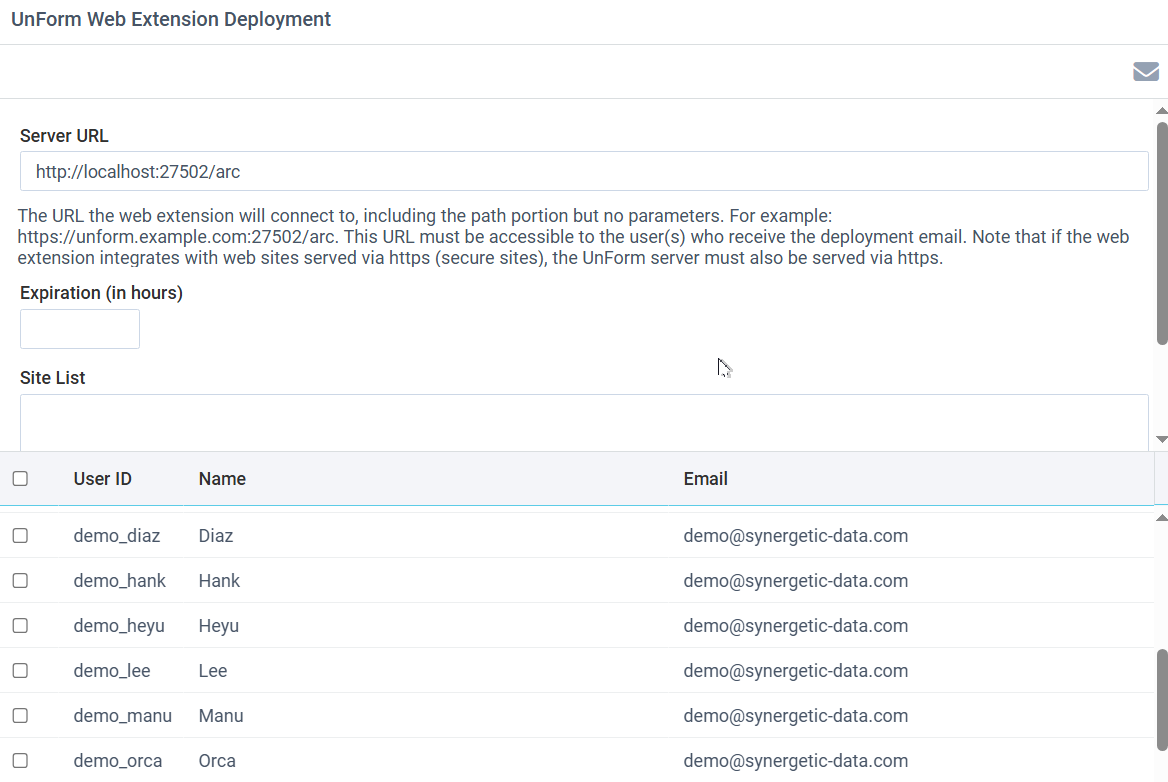
The UnForm Web Extension provides added functionality for many UnForm users. However, each user requires configuration in order for the extension to communicate with an UnForm server. The deployment tool works with the UnForm user list, and can email users an instruction email that includes a copy/paste string that will automatically configure the extension for that user.
Fill in the form, select a user, or check all desired users, and click the email toolbar button to send deployment instructions by email to the selected users. To test this, select just your own user account.
To fill in the form:
•The server URL needs to be the base URL to the server that the extension will connect to. It is normally the same URL the administrator uses, but this can be overridden to ensure an external or network-wide address is used. Note that in many cases, the web extension must be accessed with an https:// url, due to browser security standards.
•Expiration is the number of hours the copy/paste content of the email is valid.
•Site list is a list of external URL's or wildcards that determine when the web extension performs integration with, such as your ERP's browser interface. This field can usually be left blank, as site detection is generally in place in the web extension rule file.