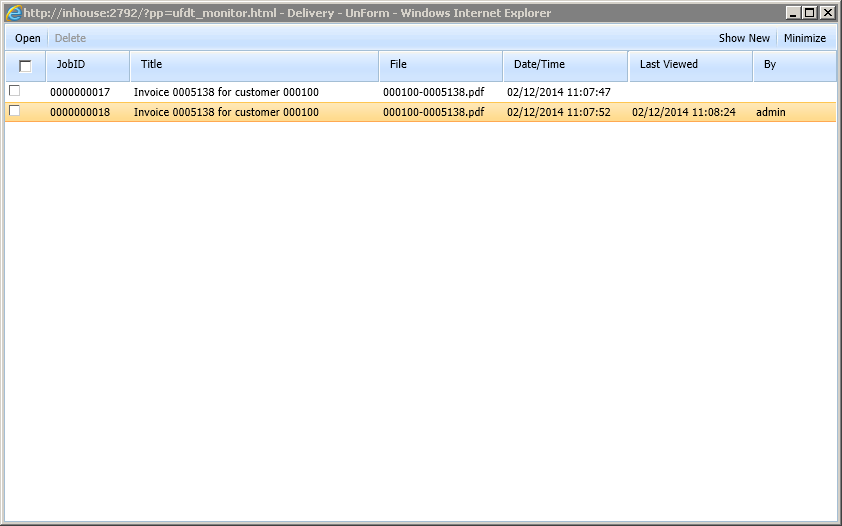
UnForm 11.0 provides desktop delivery features that enable users on the network where the UnForm server runs to receive documents or fill out forms at the time UnForm jobs run. The feature is accessed via a web browser via a URL that could be
http://servername:port |
Presents the main menu page with links to the delivery monitor. |
http://servername:port/arc?pp=ufdt_monitor.html |
Directly open the delivery browser, which displays documents waiting for the user, and monitors for form requests. This page can be minimized to provide a small display that shows document counts as buttons to open existing and new document lists. |
Optionally, you can supply a query string suffix "&ips=uniqueid" to the above URL structures. The uniqueid value can be something that will add uniqueness to the IP address that the browser monitors with, supporting Terminal Server environments where the same IP address would be used for all users. Typically there is an environment variable, such as %SESSIONNAME%, that identifies a particular session on the server. By passing this information to both the URL and UnForm job submissions, deliveries and forms can be sent to the correct user session.
Documents are pushed to a desktop delivery session via the dtdel() and dtform() code block functions. For an example of these functions.view the dtdel.rul and dtform.rul sample rule files.
As with any access to the UnForm server, when users connect to the server, they must login unless they have an active session.